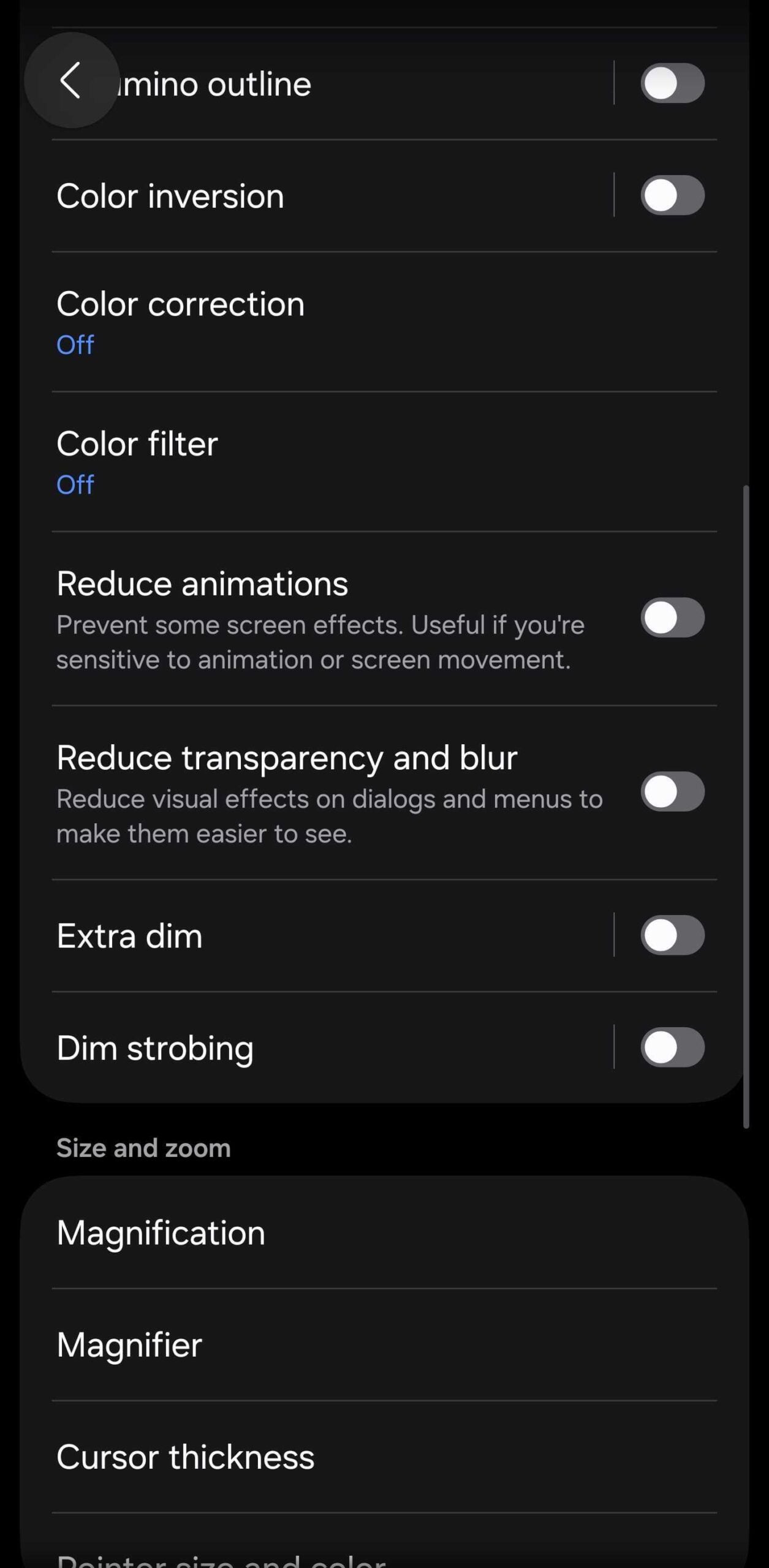

Samsung's latest One UI 8.5 firmware update introduced a handful of new accessibility features, one of which could be extremely helpful in certain situations, especially for Galaxy phone users who are sensitive to flashing lights.
When enabled, this new accessibility option automatically dims videos with strobing effects to make content more comfortable to watch. Here's how you can turn it on.
You'd think this new option would be easy to find through One UI 8.5's redesigned Search field inside the Settings app. Unfortunately, at least for now, searching for it there doesn't seem to work.
You'll have to find this new setting manually. And to do this:
- Open Settings on your One UI 8.5 device > Accessibility > Vision enhancements > Dim strobing.


According to Samsung, this feature may not work in every app or with all types of video content. And in case you're wondering whether the setting syncs across your Samsung device ecosystem, it doesn't. Dim strobing works only on the One UI 8.5 device where you enable it.
In other words, if you own both a Galaxy phone and a Galaxy Tab, turning on dim strobing on one device won't automatically enable it on the other. But you can always enable it manually on any Galaxy device you wish, as long as it has One UI 8.5.


Post a Comment